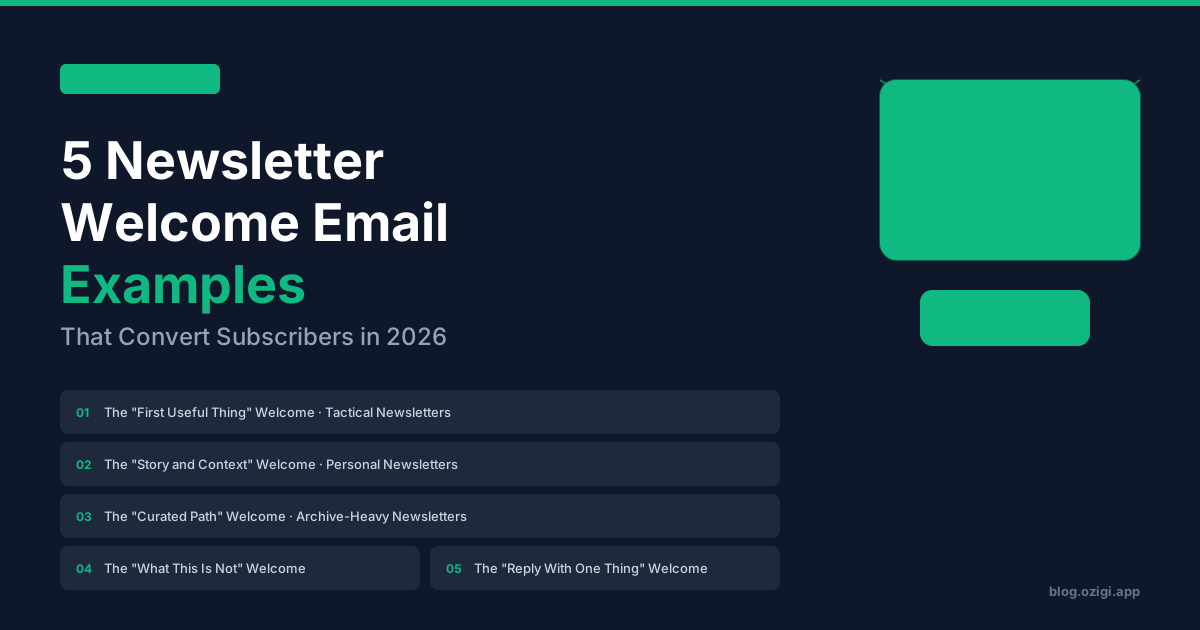
5 Newsletter Welcome Email Examples That Convert Subscribers in 2026 (Free Templates)

Founder and CEO of Ozigi. Writes about content strategy and the architecture of AI tools for technical creators.
TL;DR
The welcome email is the highest-stakes email a newsletter will ever send. Klaviyo's 2026 benchmark report shows e-commerce welcome emails average 51% open rates versus 24.8% for standard campaigns. Newsletter-specific data from MailerLite and Beehiiv's open rate dataset puts welcome opens above 60% on average, with click rates around 14% (versus 2.7% for standard newsletter emails). That gap is the difference between a subscriber who reads your second issue and one who never opens you again. This guide breaks down five welcome email templates that work in 2026, what makes each one effective, and how to adapt them. Ozigi generates the first draft of each one from your existing content if you want to skip the blank-page problem.
Why the Welcome Email Matters More Than Any Other Email
A reader who just subscribed is at peak attention. They typed their email, hit the confirm button, and are waiting to see what they signed up for. According to Klaviyo's 2026 benchmarks, welcome emails generate 14.4% click rates compared to 2.7% for standard email types. That is a 5.3x improvement that exists for one reason: the subscriber chose to receive this email and they are paying attention.
Most newsletter writers waste this attention. The default welcome email is a generic confirmation that says "thanks for subscribing, here is what to expect" and ends with a logo. The subscriber learns nothing. They form no expectation. By issue two, they have forgotten they subscribed. By issue four, they unsubscribe.
The welcome email is also the most reused content in a newsletter operation. You write it once and it runs on autopilot for every new subscriber. The investment per subscriber is essentially zero after the first send. That makes optimization here the highest-leverage time you will spend on the newsletter.
What a 2026 Welcome Email Actually Needs to Do
Five jobs, in order of priority.
Confirm the subscription is real. The subscriber needs to know they did the right thing. Generic but necessary.
Set expectations. Cadence, topic scope, what they will and will not get. A subscriber who expects weekly tactical email teardowns and gets monthly think-pieces about productivity will churn.
Create the first useful experience. The welcome email is the first deliverable. It should make the subscriber think "good, that was worth it" within the first paragraph. The welcome email is not the place to ask for more; it is the place to give the first thing of value.
Build the writer-reader relationship. The subscriber chose you over the 30 other newsletters they could have subscribed to. Show some sign that a specific person wrote this email. Voice, perspective, a small detail only the writer would include.
Give one clear next step. Reply to this email, read one thing, follow on one platform, or skip ahead to one resource. One next step, not five.
Most welcome emails fail at job three. The thanks-for-subscribing-here-is-what-to-expect format does jobs one and two and skips the rest. The five templates below do all five.
Template 1: The "First Useful Thing" Welcome (For Tactical Newsletters)
Best for: practical newsletters that promise specific tactical value (marketing tactics, engineering practices, financial moves).
Subject line (31 characters): Welcome (and your first 3 tactics)
Preview text: No fluff. Three things you can use today.
Body:
Welcome to {Newsletter Name}.
You signed up to get specific tactical advice on {topic}. Most newsletters spend the first email telling you what they are about. I want to skip that and give you the first useful thing immediately.
Here are three {tactics/moves/ideas} I have used in the last 30 days that I think you will use this week:
- {Specific tactic 1}. {One sentence on the result it produced.}
- {Specific tactic 2}. {One sentence on the result it produced.}
- {Specific tactic 3}. {One sentence on the result it produced.}
The newsletter goes out every {cadence}. Each issue covers {scope}. You will hear from me on {day} at {time}.
If anything in this email landed, reply and tell me which one. I read every reply.
{Signature}
Why this works: The first paragraph confirms the subscription and sets a clear expectation about the writing voice (concise, value-first). The three tactics deliver immediate value before the subscriber has earned it. The cadence line sets the expectation. The reply request opens the relationship.
Template 2: The "Story and Context" Welcome (For Personal Newsletters)
Best for: personal essays, founder journals, creative writing newsletters where voice and connection matter more than tactics.
Subject line (33 characters): A short story before issue one
Preview text: The thing that started this newsletter.
Body:
Hi. I am {Name} and I write {Newsletter Name}.
The shortest version of why this newsletter exists: {one to two sentences on the personal motivation}.
I started thinking about it seriously {timeframe} when {specific moment or insight}. That moment is also why this newsletter will be different from most of what you read about {topic}. {One sentence on the unique angle.}
Here is what to expect.
{Cadence}. Each issue is {format}. I will write about {topic boundaries}. I will not write about {explicit non-topics}.
The next email arrives {when}. If you want a sense of what the writing sounds like, here is one piece I am most proud of: {link}.
Reply to this email if you have a question about {topic} you want me to write about. I might write about it.
{Signature}
Why this works: The personal angle in the first three sentences creates writer-reader intimacy that tactical newsletters cannot match. The explicit non-topics ("what I will not write about") sets a sharper expectation than most welcome emails. The linked sample piece gives the subscriber a way to evaluate the voice before committing emotional energy.
Template 3: The "Curated Path" Welcome (For Archive-Heavy Newsletters)
Best for: newsletters that already have a backlog of 10 or more strong issues. Capitalizes on existing content rather than starting from zero.
Subject line (35 characters): Start here: 3 issues to read first
Preview text: Your shortcut to the best of the archive.
Body:
Welcome.
Most welcome emails ignore the fact that you just subscribed to a newsletter that already exists. I have been writing {Newsletter Name} for {timeframe} and there are {number} issues in the archive that you missed.
Three issues to start with:
{Title of most popular issue}. {One sentence on why it matters.} {Link}
{Title of most personal issue}. {One sentence on what makes it different.} {Link}
{Title of most useful issue}. {One sentence on the practical takeaway.} {Link}
New issues go out every {cadence}. The next one arrives {when}.
If you have a question about {topic}, reply and ask. The replies often turn into future issues.
{Signature}
Why this works: Three curated links into the archive give the subscriber four sessions of content (this email plus three deep reads) on day one. Newsletter writers with backlogs consistently underuse this approach. The "replies often turn into future issues" line gives the subscriber a real reason to reply.
Template 4: The "What This Is Not" Welcome (For Niche Newsletters)
Best for: newsletters with sharp positioning where the wrong subscribers cause churn.
Subject line (32 characters): Welcome (read this before issue 1)
Preview text: This newsletter is probably not what you think.
Body:
Welcome.
Before I send you the first real issue, I want to be honest about what this newsletter is and what it is not. Most welcome emails skip this and the writer ends up with subscribers who churn after issue two because they expected something different.
What this newsletter is:
- {Specific topic boundary 1}
- {Specific topic boundary 2}
- {Specific format and cadence}
What this newsletter is not:
- {Adjacent topic this newsletter avoids}
- {Common newsletter trope this newsletter rejects}
- {Specific anti-pattern in the category}
If those boundaries match what you were looking for, the first issue arrives {when}.
If they do not, here is the unsubscribe link right here: {link}. No hard feelings. Better to find out now than after four issues.
{Signature}
Why this works: The explicit unsubscribe link in the welcome email looks counterintuitive but it filters for the right subscribers and dramatically reduces churn at issue two through four. Niche newsletter writers report that explicit positioning in the welcome email produces higher engagement on the remaining list, which improves email deliverability over time.
Template 5: The "Reply With One Thing" Welcome (For Community-First Newsletters)
Best for: newsletters where the writer wants to know who is on the list and what they care about. Best at smaller scale (under 1,000 subscribers) where personal replies are feasible.
Subject line (29 characters): One question, then issue one
Preview text: Reply with the answer. I read every one.
Body:
Welcome.
Before the first issue arrives, I want to ask you one question. Your answer shapes what I write next.
The question: What is the one thing you are working on right now where you wish someone had already solved {topic} for you?
Reply to this email with your answer. Three sentences is plenty. I read every reply and the answers often turn into the issues I am most proud of.
The first real issue arrives {when}. It will be about {teaser}.
{Signature}
Why this works: Reply rate is the most valuable engagement metric a small newsletter has. ESPs use reply rate as a deliverability signal, which improves inbox placement on every future send. A welcome email that explicitly asks for a reply produces 10x to 20x the reply rate of a standard welcome email and pays dividends across the entire newsletter operation.
What Most Newsletter Welcome Emails Get Wrong
Three patterns from analyzing welcome emails in 2025 and 2026.
They thank instead of give. The default welcome email spends three paragraphs thanking the subscriber. The subscriber does not need thanks. They need the first useful thing.
They name the writer without showing the voice. "I am {Name}, founder of {Company}, with 15 years in {industry}." None of that demonstrates voice. Show, do not tell. The welcome email should sound exactly like the newsletter sounds.
They ask for too much. "Reply to this email, follow me on X, follow me on LinkedIn, subscribe to my podcast, share with three friends." Five next steps is zero next steps. Pick one.
They are too long. A 1,500-word welcome email loses the subscriber. The templates above are between 150 and 250 words for a reason. The first email is not the place to dump the entire content strategy.
They forget Apple Mail Privacy Protection. Since 2021, Apple Mail pre-fetches images and inflates open rates by 15 to 20 percentage points. The reported "open rate" on your welcome email is noise. The metrics that matter are reply rate (for engagement) and click-through rate to whatever next step you offered.
Subject Line Rules for Welcome Emails in 2026
Verified from multiple datasets covering millions of campaigns.
- Aim for 30 to 50 characters. Subject lines longer than 50 characters get truncated on most mobile clients. Gmail mobile shows about 30 characters before truncation. iPhone Mail shows about 41.
- Front-load the value. If your subject line gets truncated, the first 30 characters need to communicate the message on their own.
- Avoid the word "Welcome" alone. Almost every welcome email starts with "Welcome to..." The format is recognizable to spam filters and to subscribers who scroll past it. Use Welcome as a tag inside a more specific subject ("Welcome (and your first 3 tactics)") rather than as the whole subject.
- Personalization helps but is not magic. Backlinko data shows personalized subject lines achieve 30.5% higher open rates. The catch: most modern personalization tokens (first name) get used so often that they no longer drive lift. Topic-based personalization (industry, company name) still works.
Where to Send Your Welcome Email From
The free ESP options that handle welcome email automation well in 2026:
- Beehiiv Launch (free, up to 2,500 subscribers): unlimited sends, custom domain, welcome email automation included
- EmailOctopus (free, up to 2,500 subscribers): basic automation including welcome flow
- MailerLite (free, up to 500 subscribers): full automation builder including multi-step welcome sequences
- Buttondown (free, up to 100 subscribers): Markdown-first, API access for technical workflows
- Kit (formerly ConvertKit, free up to 10,000 subscribers): broadcasts only on free tier, no welcome automation without upgrade
For most new newsletter writers, MailerLite is the strongest free option specifically for welcome emails because the automation builder lets you sequence multi-step welcomes on the free plan.
How to Generate a Welcome Email Draft in 15 Minutes With Ozigi
The blank-page problem for a welcome email is real. Most writers stare at the screen for an hour before producing something they delete two days later.
A faster workflow:
- Open Ozigi's free newsletter generator and use the unauthenticated path. No signup required.
- Drop in the URL of your newsletter signup page, your strongest existing newsletter issue, and a one-sentence description of who the newsletter is for.
- Generate a welcome email draft shaped by your existing voice. Ozigi's persona system means the welcome email sounds like the rest of your newsletter, not like generic AI copy.
- Edit the personal details that only you can add (the specific story, the unique angle, the writer-reader detail).
- Set the welcome email to send automatically to every new subscriber via your ESP.
Total time: 15 to 20 minutes from blank page to live automation. Compare this to the default workflow of writing the welcome email from scratch (which most writers procrastinate on indefinitely) and the math is obvious.
How to Test Your Welcome Email
Send the welcome to a list of five people who match your target subscriber. Ask three questions:
- After reading the email, do you know what the newsletter is about?
- After reading the email, do you have a clear sense of what the next email will contain?
- After reading the email, what is the one thing you would do next?
If all three answers are clear and consistent across the five readers, the welcome email is working. If the answers diverge, the welcome email is ambiguous and the subscribers will project their own expectations onto the newsletter, which produces churn.
FAQ
What is the average open rate for newsletter welcome emails in 2026? Klaviyo's 2026 benchmark report shows e-commerce welcome emails average 51% open rates. Newsletter-specific data from MailerLite and Beehiiv put welcome opens above 60%. Click rates average 14.4% on welcome emails versus 2.7% on standard campaigns.
How long should a newsletter welcome email be? Between 150 and 300 words. Long enough to set expectations and deliver the first useful thing. Short enough that subscribers actually read it. The templates in this guide are between 150 and 250 words.
Should I send the welcome email immediately or with a delay? Immediately. Klaviyo data shows welcome emails sent within five minutes of subscription generate dramatically higher engagement than delayed sends. The subscriber chose to subscribe a few seconds ago. Their attention will not be higher than it is right now.
What is the best subject line for a welcome email? Specific, between 30 and 50 characters, front-loaded with the value. Avoid "Welcome to..." as the only words. Better: "Welcome (and your first 3 tactics)" or "Welcome (read this before issue 1)." The subject line should tell the subscriber what is inside, not just confirm they subscribed.
Should I ask the subscriber to reply in the welcome email? Yes, if you can handle the volume. Reply rate is the single best deliverability signal a small newsletter has, and welcome emails are the email most likely to produce a reply because the subscriber is at peak attention. Below 1,000 subscribers, replies are feasible to handle personally.
Can Ozigi write the welcome email for me? Ozigi generates the first draft shaped by your existing voice and content. The personal details (the specific story, the unique angle, the writer-reader detail) you still add. The draft compression saves the 60-minute blank-page problem and produces something you can edit in 15 minutes.
Should I include unsubscribe info in the welcome email? Yes, by law (CAN-SPAM, GDPR). Most ESPs auto-include this in the footer. Some newsletter writers also include a soft unsubscribe link in the body of the welcome email for niche newsletters where the wrong subscribers cause churn. This filters the list and improves engagement on the remaining subscribers.
Is the Ozigi codebase open source? Yes, on GitHub at Ozigi-app/OziGi. The persona system and email delivery layer are documented on the Ozigi blog.
This article was generated and refined on Ozigi. Try the free newsletter generator yourself — no signup required.
About the author
Founder and CEO of Ozigi. Writes about content strategy and the architecture of AI tools for technical creators.