How Do You Find B2B Leads on GitHub and Dev.to?

Founder and CEO of Ozigi. Writes about go-to-market, content strategy, and the tooling small teams rely on.
TL;DR: GitHub and Dev.to are open lead databases for anyone selling to developers. On GitHub you can search user bios with qualifiers like
in:bio,language:, andlocation:to find people who match your ICP, then recover a working email from their public commit history when the profile hides it. On Dev.to you can find authors by the tags they write under. Both sources are free and public. The work that matters is filtering: a raw keyword search returns noise, so you score each result for fit before you write to anyone. This guide shows the exact mechanics and how to automate them.
If you sell a developer product, your buyers are not hiding. With 180 million developers now on GitHub, per GitHub's 2025 Octoverse report, the people you want are publishing their role, their stack, and their problems in public every day.
You do not need an expensive contact database to reach them. You need a way to search the signals they already broadcast. Here is how to do that on the two richest sources.
Why Are GitHub and Dev.to Good Places to Find B2B Leads?
They are good because developers reveal fit and intent in public on both platforms, in structured, searchable form. A GitHub profile tells you what someone builds and which tools they use. A Dev.to post tells you what they care about right now.
This is the opposite of a purchased B2B list, where you get a name, a title, and a guess. On GitHub and Dev.to you can see the actual work. Someone who maintains a public API client and writes about rate limiting is not a guess. They are a qualified lead for an API tool, with the evidence attached.
Before you start, decide who you are looking for. Sourcing without a sharp ideal customer profile for developers just produces a big pile of irrelevant profiles. With a clear ICP, every search below gets precise.
How Do You Search GitHub for People Who Match Your ICP?
You search GitHub's user index with qualifiers that filter on bio text, language, location, and follower count. The GitHub search API exposes these directly, so you can express most of an ICP as a single query.
The qualifiers that matter most for lead sourcing:
in:biomatches keywords inside a person's biotype:userrestricts results to people, not organizations or reposlanguage:filters by the languages in their repositorieslocation:filters by the location on their profilefollowers:>Nfilters by audience size, useful sparingly
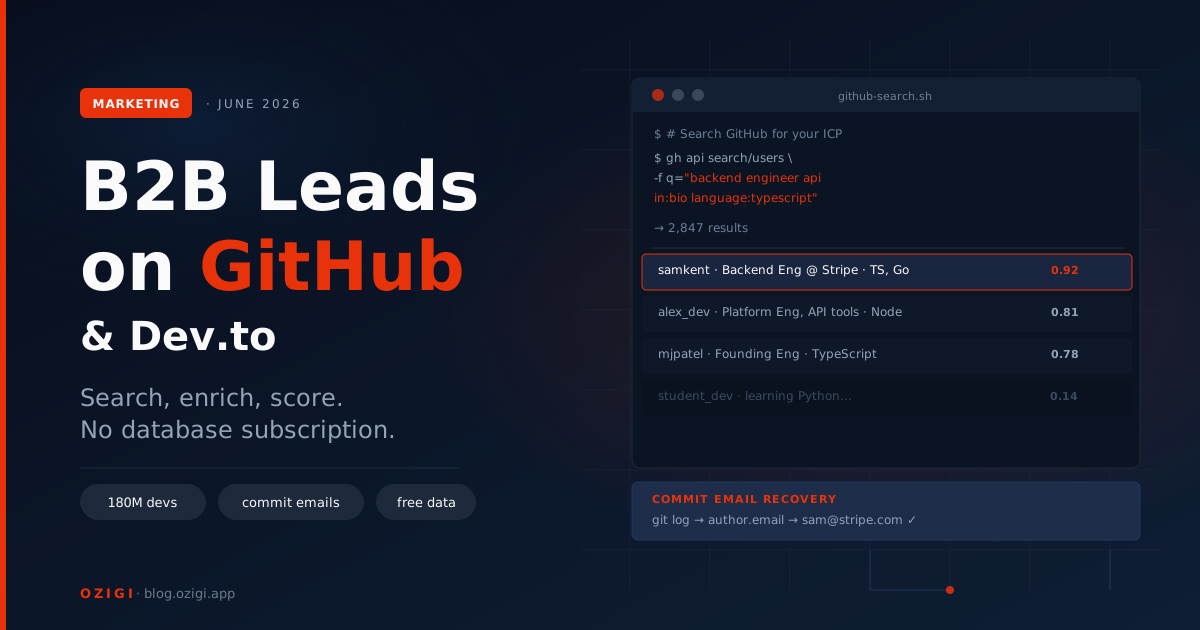
A worked example. Say your ICP is backend engineers who work with TypeScript and care about APIs. A user search query looks like this:
"backend engineer" api in:bio language:typescript type:user
That returns people whose bios mention backend engineering and APIs and who ship TypeScript. From each profile you can pull the name, bio, company, location, and the topic tags implied by their work. This is exactly the approach the Ozigi sourcing engine takes: it builds a bio query from your ICP keywords, runs it against the GitHub user search, and extracts the matching profiles automatically.
One caution: respect GitHub's API rate limits and terms of service. Source steadily rather than hammering the API, and treat the data as what it is, public profiles of real people, not a list to abuse.
How Do You Find a Lead's Email When GitHub Hides It?
When a profile email is hidden, you can often recover a real address from the person's public commit history. Every Git commit carries an author email, and that email is visible through the public commits API.
The logic is straightforward. If the profile email field is empty, look at the user's recent public commits and read the author email attached to them. That address is usually a real, working inbox, because it is the one the developer actually commits with. A couple of filters keep this clean:
- Skip GitHub
noreplyaddresses, which are placeholders that do not reach anyone - Validate the format so you are not storing junk
This is the technique Ozigi uses to enrich GitHub leads whose profile email is private. It is built on publicly visible commit metadata, not on guessing or buying data. That said, finding an email is not the same as being allowed to email it. Sending requires following the rules in your recipient's region, which is a separate topic worth getting right before you press send. We will cover the compliance side, CAN-SPAM and GDPR for small teams, in an upcoming piece in this series.
How Do You Find Leads on Dev.to?
On Dev.to you find leads by the tags they write under and the posts they publish. Tags map directly to topics, so the authors writing under a tag are, by definition, people who care about that topic.
The approach: pick the tags that match your ICP, pull the recent articles under those tags, and collect the authors. A person who writes regularly about, say, webdev or devops or api is telling you exactly where their interest sits. From each author profile you get a name, a bio, and often links to their other accounts. Dev.to does not expose emails, so pair it with the GitHub commit approach above when the same person appears on both.
The strength of Dev.to is intent. Someone who took the time to write a tutorial about a problem your product solves is a warmer lead than a name pulled from a database, because they have already shown they think about this problem in public.
How Do You Score and Filter So You Are Not Emailing Noise?
You score every sourced lead against your ICP before reaching out, and you only write to the strong matches. A keyword search will always pull in people who match the words but not the intent, and emailing them wastes your sending reputation and their time.
The cleanest way to score at any volume is to let a model do the first pass. Ozigi sends each lead's bio, company, and tags to Gemini with the ICP and asks for a match score from 0 to 1. A profile that mentions your keywords but clearly is not your buyer scores low and gets dropped. A profile that fits on multiple signals scores high and moves into the sequence.
This step is what separates a usable list from a spam cannon. Sourcing 200 profiles is easy. The value is in the 40 that are actually worth a personal message. Skipping the scoring pass is the single most common reason developer outreach feels like spam to the people receiving it.
Is It Allowed to Source Leads From GitHub and Dev.to?
Reading public profile data is generally acceptable, but two rules apply: respect each platform's terms of service and rate limits, and follow the email and privacy laws that govern actually contacting people. Sourcing and sending are different activities with different rules.
On the sourcing side, both platforms expose public data through documented APIs, and using those APIs within their limits is normal. Do not scrape aggressively, do not evade rate limits, and do not republish people's data. On the sending side, contacting someone is governed by laws like CAN-SPAM in the US and GDPR in the EU, which is its own subject. This article is about finding fit, not legal advice; treat the compliance step as required homework before any campaign goes live.
How Do You Automate This Without Writing Scrapers?
You automate it by defining your ICP once and letting a GTM engine run the sourcing, enrichment, and scoring for you. Writing and maintaining your own GitHub and Dev.to scrapers is doable, but it is real engineering work that competes with building your product.
This is precisely what we built the Ozigi GTM engine to handle. You describe your ICP, pick GitHub and Dev.to as sources, and a campaign sources the profiles, recovers emails from commit history, extracts topic tags, and scores every lead with Gemini. The qualified leads flow straight into an email or LinkedIn sequence written in your voice. The free tier runs the full motion with no credit card, and you can watch it work on the live demo. For how it compares to buying a data tool plus a sender plus a writing tool, see the best free GTM tool comparison.
Frequently Asked Questions
Can you find B2B leads on GitHub? Yes. GitHub's user search lets you filter profiles by bio keywords, programming language, location, and follower count, so you can find developers who match your ideal customer profile. With 180 million developers on the platform publishing their role and stack publicly, GitHub is one of the strongest lead sources for any developer product.
How do you find someone's email from GitHub?
When a profile email is hidden, you can often recover one from the person's public commit history, since every Git commit carries an author email. Read the email on recent public commits, skip GitHub noreply placeholder addresses, and validate the format. This uses publicly visible commit metadata rather than purchased data.
What GitHub search qualifiers help with lead generation?
The most useful are in:bio to match keywords in a bio, type:user to return people rather than repos, language: to filter by stack, location: to filter by region, and followers: to filter by audience. Combining them turns most of an ideal customer profile into a single searchable query.
How do you find leads on Dev.to? Pick the tags that match your ICP, pull recent articles under those tags, and collect the authors. Tags map directly to topics, so the people writing under them already care about that subject. Dev.to does not expose emails, so pair it with GitHub commit data when the same person appears on both platforms.
Is it legal to scrape GitHub and Dev.to for leads? Reading public data through the platforms' documented APIs, within their rate limits and terms of service, is generally acceptable. Contacting the people you find is a separate matter governed by laws such as CAN-SPAM and GDPR. Source responsibly and confirm the sending rules for your recipients' region before running a campaign.
How do you avoid sending spam when sourcing from these platforms? Score every sourced lead against your ICP before writing, and only contact strong matches. A keyword search always returns people who match the words but not the intent. Filtering with an AI scoring pass turns a raw list of hundreds into the few dozen people genuinely worth a specific, personal message.
Built for people who sell to developers, Ozigi sources from GitHub and Dev.to, recovers emails, scores leads against your ICP, and writes the outreach in your voice. Free to start. Once you have a list, try the free cold email generator to draft the first message.
About the author
Founder and CEO of Ozigi. Writes about go-to-market, content strategy, and the tooling small teams rely on.