The Shared Responsibility Model: Who Really Owns Your Data in the Cloud?

Technical writer and Cloud engineer focused on infrastructure security and developer tooling. Writes about cloud architecture, IAM, and the decisions that lead to incidents.
TL;DR: Your cloud provider secures the physical infrastructure — data centres, hypervisors, and the network backbone. You own everything you put inside it: access controls, encryption configuration, OS patches on your VMs, and network rules. Gartner estimated that 99% of cloud security failures through 2025 traced back to customer misconfiguration, not provider failure. This guide maps exactly where your responsibility begins, by service type and by provider, and what to do about it.
In March 2024, a fintech company discovered that an S3 bucket containing six months of customer transaction records had been publicly readable for eleven days. AWS's infrastructure was functioning exactly as designed. The bucket had "Block Public Access" turned off — a toggle the team had flipped temporarily during a debugging session and never re-enabled. AWS sent no alert. There was no breach of AWS's systems. The data walked out through a door the engineering team left open.
This is the shared responsibility model in practice. And the reason it catches teams off guard is that "shared" sounds like a partnership where both parties carry roughly equal weight. It isn't. Responsibility is divided sharply along a specific line, and on one side of that line — the side that causes nearly every cloud security incident — sits your team.
Understanding where that line falls, and what it actually means for day-to-day engineering decisions, is one of the highest-leverage security investments a team can make.
What the Model Actually Says
Every major cloud provider frames this the same way, even if the language differs. AWS calls it "security of the cloud versus security in the cloud." GCP describes it as "Shared Fate." Azure uses "Shared Responsibility." The principle is identical across all three.
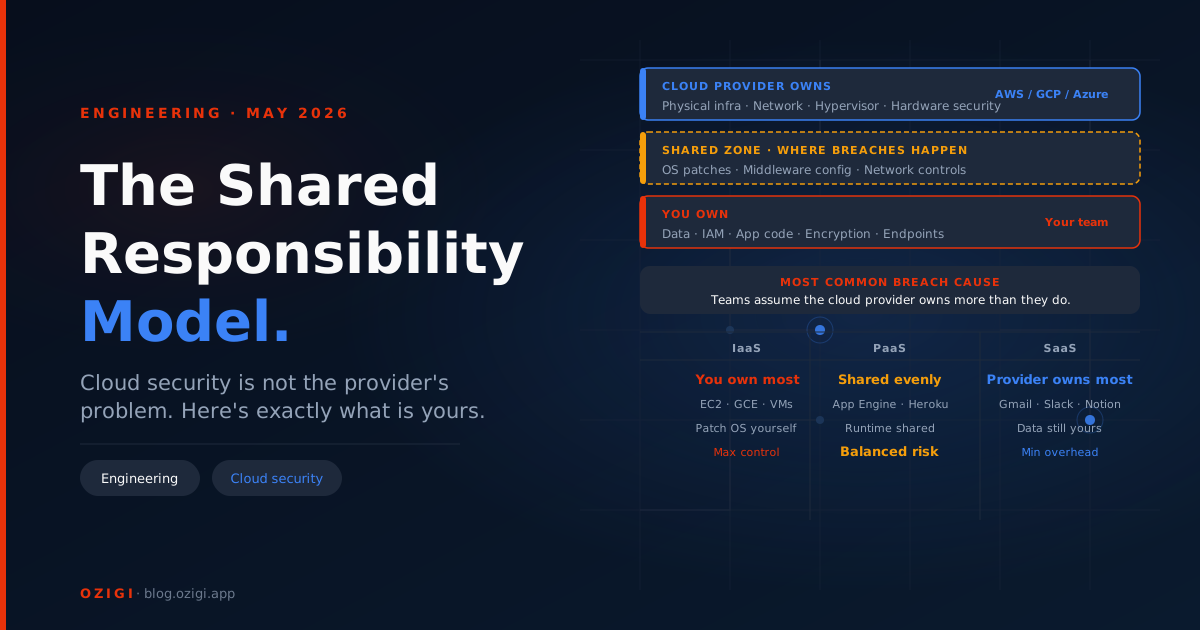
The provider secures the infrastructure layer: physical data centres, hardware, the global network backbone, hypervisor isolation between tenants, and the underlying software of managed services. You will never need to worry about someone compromising an AWS data centre or Azure's network routers. That layer is genuinely the provider's problem.
You own everything you deploy into that infrastructure. That means identity and access management, how your data is encrypted, the network rules around your resources, the operating system running on your virtual machines, your application code, and every configuration decision made during deployment.
Where most teams get into trouble is the grey area: managed services. When you run a database on AWS RDS instead of on a self-managed EC2 instance, Amazon handles OS patching and the database engine itself. But you still own the access controls on that database, the encryption key configuration, who has permission to connect, and the network security group rules around it. The shift to a managed service moves some responsibilities to the provider — it does not move all of them.

How Responsibility Shifts Across Service Types
The practical split changes depending on what kind of cloud service you are running.
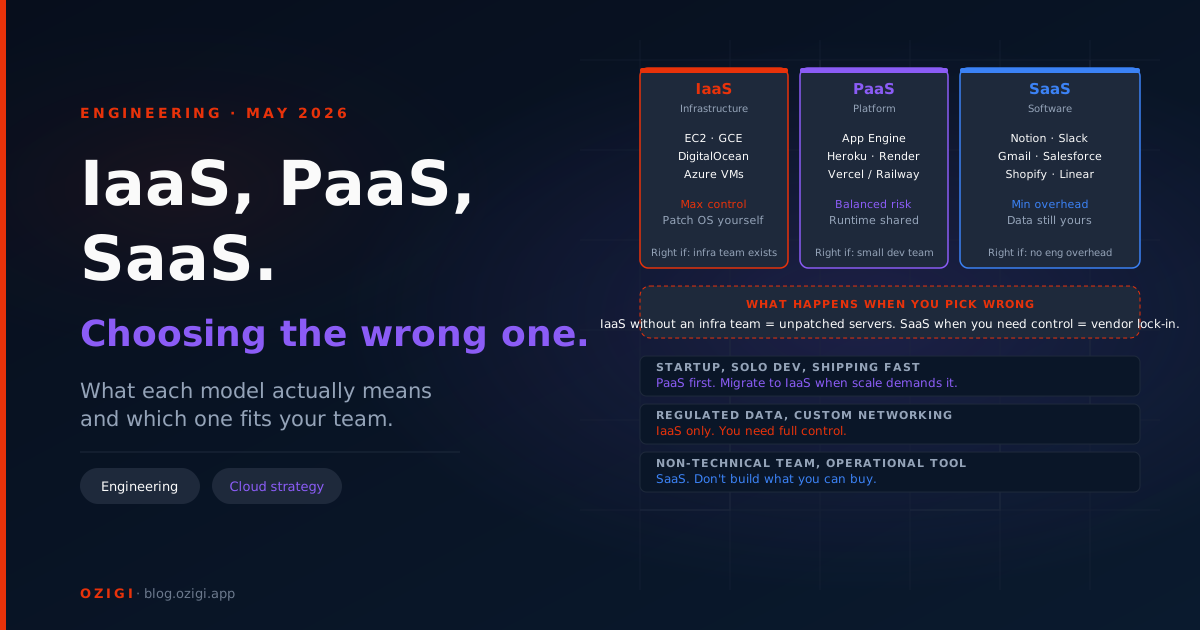
IaaS — Infrastructure as a Service (EC2, Azure VMs, GCE instances). This is the widest customer responsibility. The provider secures the physical machine and the hypervisor. You own everything above that: the operating system, every package installed on it, runtime dependencies, application code, firewall rules, and patch management. A known CVE published for OpenSSL in February that your EC2 fleet has not patched by March is a vulnerability that sits in your responsibility zone, not AWS's. AWS Systems Manager Patch Manager, Azure Update Management, and GCP OS Config can automate most of this work — but deploying and configuring those tools is, again, your responsibility.
PaaS — Platform as a Service (AWS Lambda, Azure App Service, Google App Engine). The provider takes on more: the runtime, the operating system underneath it, and infrastructure scaling. Your surface narrows to your code, your environment variables, your function's IAM role, and your input validation. The common mistake here is assuming that because the infrastructure is abstract, so is the security surface. A Lambda function with an over-permissive IAM role attached — "Action": "*", "Resource": "*" — is a significant vulnerability sitting entirely in your lane, not Amazon's.
SaaS — Software as a Service (Google Workspace, Microsoft 365, Salesforce). Your responsibility surface narrows to three things: which users have access, what data you put in, and how that data is configured and shared. The provider manages everything else. This feels safe, and structurally it is — but the most common SaaS-layer incident is a misconfigured sharing setting exposing internal documents to anyone with a link.
The Four Things You Always Own
Regardless of whether you are running IaaS, PaaS, or SaaS, four areas never transfer to the provider.
Identity and access management. Who can touch what, under what conditions, with what level of permission. Every cloud provider gives you the tools — AWS IAM, Azure Active Directory, GCP Cloud IAM — but the configuration is entirely yours. The default posture when engineers move fast is over-permissioned roles: a developer gets admin access for a one-time task and the permission is never revoked. A service account gets roles/editor because it was easier than scoping it to roles/storage.objectCreator. This is consistently the entry point in cloud incident post-mortems. Implement least-privilege access, enforce MFA on every human identity accessing cloud resources, and audit permissions on a schedule — not just when something breaks.
Data encryption. Cloud providers offer encryption tools. AWS KMS, Azure Key Vault, and GCP Cloud KMS are all available and mature. Using them is your call. Enabling encryption at rest and in transit is not automatic in every service. More importantly, managing and rotating the keys is always your responsibility. An encryption key that has never been rotated, or a key stored in plaintext in an environment variable rather than a secrets manager, is a gap that the provider's tooling cannot compensate for.
Network configuration. Security groups, VPC rules, firewall policies, open ports. These accumulate over time in ways that create genuine risk. A port opened for debugging during a late-night incident and never closed. A security group rule that allows inbound traffic from 0.0.0.0/0 on port 22. Network security auditing is not a one-time setup — it is a continuous operational practice. Tools like AWS Security Hub, Microsoft Defender for Cloud, and GCP Security Command Center will surface open network rules automatically, but you have to deploy them and act on what they surface.
Operating system and application patches (IaaS). If you are running virtual machines, you are running a patching operation whether you acknowledge it or not. The provider patches the hypervisor. The OS and everything installed on it is yours. A team running 40 EC2 instances across three environments without a defined patching process has 40 nodes accumulating unpatched CVEs over time.
A Practical Starting Point for Each Provider
The tools are not identical across AWS, GCP, and Azure, but the workflow is consistent: enable logging first, then audit IAM, then check network exposure, then verify encryption.
On AWS: Enable CloudTrail in every region — it is not on by default in all regions, and gaps mean blind spots in your audit log. Turn on AWS Config to track configuration changes over time. Use the IAM Access Analyzer to identify roles and policies that grant unintended access to external accounts or public resources. Check every S3 bucket against the "Block Public Access" setting at the account level, not just the bucket level. Use Trusted Advisor or Security Hub to run an automated posture check as a baseline.
On Azure: Enable Microsoft Defender for Cloud and work through the Secure Score recommendations — each recommendation maps directly to a misconfiguration category with a remediation path. Review Azure AD Conditional Access policies: MFA enforcement should be applied to all users, not just administrators. Audit storage account access levels; the default setting for new containers is private, but any container set to "Container" or "Blob" access level is publicly readable. Use Azure Policy to enforce guardrails across subscriptions automatically.
On GCP: Enable Cloud Audit Logs for Admin Activity and Data Access across all services. Use the Security Command Center to get a continuous view of misconfigurations, public storage buckets, and over-permissive IAM bindings. GCP enables many security defaults that AWS and Azure leave off by default — but defaults only cover what they cover. Review VPC firewall rules for rules that allow ingress from 0.0.0.0/0 on administrative ports (22, 3389). Check that service accounts follow a one-service-account-per-workload pattern rather than shared accounts with broad permissions.

The Misconfiguration Patterns That Keep Appearing
Cloud breach post-mortems are remarkably repetitive. The same patterns surface across incidents, across providers, and across company sizes.
| Pattern | What it looks like in practice | Detection tool |
|---|---|---|
| Publicly exposed storage | S3 bucket with "Block Public Access" off; Azure Blob set to "Container" access; GCS bucket with allUsers permission. Attackers scan for these automatically in minutes. | AWS Security Hub · Azure Defender for Cloud · GCP Security Command Center |
| Overprivileged IAM roles | A role granted AdministratorAccess for a one-off task and never scoped back down. A CI/CD service account with write access to every S3 bucket when it needs one. | AWS IAM Access Analyzer · GCP IAM Recommender · Azure AD Access Reviews |
| Disabled or incomplete logging | CloudTrail not enabled in every region. Logs exist but aren't centralised into a SIEM. No defined retention period. Reconstruction after an incident is impossible. | AWS CloudTrail · Azure Monitor · GCP Cloud Audit Logs |
| Open management ports | Port 22 or 3389 open to 0.0.0.0/0 in a security group — added for a debugging session and never closed. Rules accumulate faster than they are audited. | AWS Trusted Advisor · Azure Security Center · GCP VPC Firewall Rules |
| Unrotated or plaintext keys | Encryption keys that have never been rotated. KMS keys or service account JSON files stored in environment variables or committed to a repository. | AWS KMS Key Rotation · Azure Key Vault · GCP Secret Manager |
The Mental Model That Actually Helps
The apartment analogy used in most explanations of this model undersells the customer's operational responsibility. A better frame: you have rented space in a highly secure building. The building's locks, cameras, security guards, and structural integrity are all the landlord's problem. But inside your unit, you decide who gets a key, whether to lock your own door, what you store there, and whether to tell the building when you have a guest. If you leave your door unlocked and someone walks in, the landlord's building security is irrelevant.
The cloud provider's infrastructure is solid. The gap — consistently, in nearly every cloud security incident — is in what engineering teams configure and leave unchecked once they are inside it. The shared responsibility model does not ask teams to be security specialists. It asks them to understand the line, take ownership of their side of it, and use the tooling the provider already supplies to stay on top of it.
Start with logging, audit IAM, check network exposure, and verify encryption is actually configured rather than assumed. That sequence, applied to a real environment, closes more risk than most dedicated security programmes.
Conclusion
The shared responsibility model is not a complicated idea. The provider secures the infrastructure it runs. You secure everything you deploy into it. What makes it operationally hard is that the line between those two zones is not always obvious — and it shifts depending on whether you are running a virtual machine, a managed database, or a SaaS tool.
The incidents that make post-mortems are not caused by AWS losing a data centre or Azure failing to patch a hypervisor. They are caused by an S3 bucket left public, a role that accumulated too many permissions, a logging gap that made reconstruction impossible. The infrastructure is solid. The gap is always on the customer side of the line — in configuration decisions made quickly and never revisited.
The practical path forward is not to become a security team overnight. It is to do four things consistently: keep logging on and centralised, audit IAM permissions on a schedule rather than only after incidents, check network exposure automatically using the tools your provider already gives you, and verify that encryption is actually configured rather than assumed. None of these require deep security expertise. They require a defined process and someone accountable for running it.
Since you're here: Ozigi also ships a handful of free, no-signup tools — a free cold email generator, a free LinkedIn outreach generator, a free long-form article generator, and a free newsletter generator. Worth a look if any of that's useful to you.
About the author
Technical writer and Cloud engineer focused on infrastructure security and developer tooling. Writes about cloud architecture, IAM, and the decisions that lead to incidents.