How Many Cold Emails Can You Send Per Day Without Landing in Spam?

Founder and CEO of Ozigi. Writes about go-to-market, content strategy, and the tooling small teams rely on.
TL;DR: Send 20 to 50 cold emails per inbox per day, and treat that number as per inbox, not per domain or per day overall. New domains should start lower, around 10 to 20, and ramp up over a few weeks. The cap includes any warmup sends running on that inbox. To send more, add more authenticated inboxes rather than pushing one harder. Keep your spam complaint rate under 0.1% and your bounce rate under about 2%, because Google now rejects mail that crosses its thresholds. The separate 5,000-a-day rule applies to bulk marketing to consumer inboxes, but its authentication requirements apply to everyone.
The honest answer to "how many cold emails can I send per day" is lower than most people want, and the limit is measured in the wrong unit by almost everyone who asks.
The ceiling is not your daily total. It is per inbox. Understanding that one distinction is what separates a campaign that fills pipeline from one that burns a domain in three days. Here is the full picture, including the provider rules that now decide whether your mail arrives at all.
How Many Cold Emails Can You Safely Send Per Day?
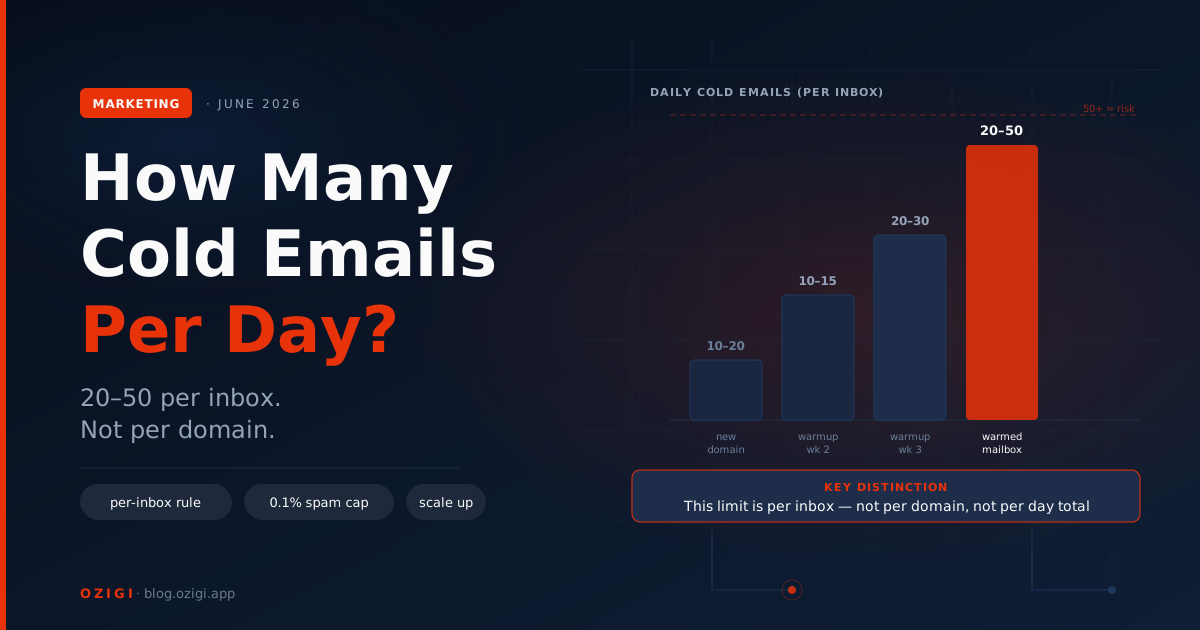
The safe range is 20 to 50 cold emails per inbox per day for a warmed mailbox, and 10 to 20 for a new one. Push a single inbox past that and spam filters notice fast, even with everything else set up correctly.
Three things move the number: domain age, warmup stage, and list quality. A domain you registered last week has no reputation and should send little. A domain with two years of clean sending history can run higher. And no volume is safe if your list is full of invalid addresses, because bounces wreck your reputation faster than volume does.
There is one detail most guides bury: the cap includes warmup emails. If a warmup tool is sending 25 messages a day from that inbox to build reputation, you have roughly 25 cold slots left, not 50. Count both against the same ceiling.
Why Is the Limit Per Inbox and Not Per Day Overall?
The limit is per inbox because inbox providers judge reputation at the level of the sending address and its domain, not your campaign. Each mailbox earns its own trust, so each mailbox carries its own ceiling.
This changes how you scale. You do not send more by cranking one inbox to its limit. You add inboxes, each warmed separately, ideally spread across a few domains. The rough math:
| Daily cold volume | Inboxes needed (at ~40/inbox) | Domains (at 3 to 5 inboxes each) |
|---|---|---|
| 40 | 1 | 1 |
| 200 | 5 | 1 to 2 |
| 500 | 12 to 13 | 3 to 4 |
| 1,000 | 25 to 34 | 5 to 10 |
The pattern is clear: real volume comes from infrastructure, not from one overloaded mailbox. A solo founder rarely needs this. A team scaling outbound should plan inboxes and domains the way they would plan servers.
What Is the 5,000-Email Bulk Sender Rule, and Does It Apply to Cold Email?
The 5,000-email rule is the threshold Gmail and Yahoo use to classify a domain as a bulk sender, triggering stricter requirements. It applies to anyone sending 5,000 or more messages a day to consumer Gmail or Yahoo addresses, and once a domain crosses it, the classification is permanent.
In practice, cold email should stay well under 5,000 per inbox anyway, so the threshold rarely bites a sane cold campaign directly. But two parts of the rule apply to every sender regardless of volume: you must authenticate with SPF and DKIM, and you must keep your spam rate low. Since early 2024, Gmail and Yahoo require bulk senders to authenticate with SPF, DKIM, and DMARC, support one-click unsubscribe, and stay under a spam threshold, per Google's sender guidelines. Microsoft added similar rules for Outlook and Hotmail in May 2025.
So the bulk rule is less a volume cap for cold email and more a reminder: authenticate everything, keep complaints near zero, and make unsubscribing easy.
What Spam and Bounce Rates Will Get You Flagged?
Keep your spam complaint rate under 0.1% and your bounce rate under roughly 2%. Google treats 0.1% as the working ceiling for healthy senders and 0.3% as the hard line where enforcement begins.
The numbers are unforgiving at low volume. If you send 1,000 emails and three people mark you as spam, you have hit 0.3%. That is why list quality matters more than raw volume: a clean, verified list keeps both bounces and complaints down, while a dirty list spikes both at once.
Enforcement also got stricter recently. Google moved from temporary delays to permanent rejections for non-compliant mail starting in November 2025, so the cost of crossing a threshold is no longer a slap on the wrist. Watch your numbers in a postmaster tool, and pull back the moment bounces or complaints climb.
How Do You Scale Cold Email Volume Safely?
You scale by adding authenticated inboxes across multiple domains, warming each one, and rotating sends across them. Volume is an infrastructure problem, not a per-email setting you turn up.
A safe scaling setup looks like this: register a few sending domains separate from your main brand domain, set up SPF, DKIM, and DMARC on each, create 3 to 5 mailboxes per domain, and warm them on a staggered schedule so they do not all come online at once. Then distribute your daily sends across the pool, keeping each inbox under its ceiling. Getting each domain ready is its own process, covered in the companion guide on how to warm up a sending domain in 2026.
How Should a Small Team Think About Outbound Volume?
A small team should send fewer, better-targeted emails to verified addresses rather than chasing volume. The teams winning at cold email in 2026 are not the ones sending the most. They are the ones whose lists are clean and whose messages earn replies.
This connects back to targeting. A tight ideal customer profile and real personalization mean you need far less volume to book the same meetings, because your reply rate is higher and your complaint rate is lower. Volume without targeting just burns domains faster. The whole motion fits together: better leads, better copy, lower volume, healthier sending.
In the Ozigi GTM engine, each campaign runs under daily send limits by design, so the sequence paces itself rather than blasting a list and tripping a filter. The point is the same as everything above: steady and targeted beats fast and broad.
Frequently Asked Questions
How many cold emails can I send per day? Send 20 to 50 per inbox per day for a warmed mailbox, and 10 to 20 for a new one. The limit is per inbox, not per domain, and it includes any warmup emails running on that inbox. New domains and unverified lists lower the safe number; clean lists and established domains raise it.
Is the cold email limit per inbox or per domain? Per inbox. Inbox providers judge reputation at the level of the sending address, so each mailbox carries its own ceiling. To send more, add more authenticated inboxes, typically 3 to 5 per domain across several domains, rather than pushing a single mailbox past its safe volume.
Does the 5,000-emails-per-day rule apply to cold email? The 5,000-a-day threshold classifies a domain as a bulk sender to consumer Gmail and Yahoo inboxes, which a sane cold campaign stays under per inbox. But its core requirements, SPF, DKIM, and DMARC authentication plus low spam rates, apply to every sender regardless of volume.
What spam complaint rate is safe for cold email? Keep it under 0.1%. Google treats 0.1% as the working ceiling and 0.3% as the hard line where enforcement begins. At low volume the margin is thin: 3 complaints on 1,000 emails already hits 0.3%. Clean, verified lists are the main way to keep complaints near zero.
What bounce rate is too high for cold email? Aim to keep bounces under about 2%. A spike above 3% can damage your sender reputation and set a domain back by weeks. High bounce rates almost always come from unverified or stale lists, so verify every address before it enters a sequence.
How do I send thousands of cold emails a day safely? Use infrastructure, not brute force. Spread the volume across many authenticated inboxes on multiple domains, keep each inbox under 40 to 50 sends a day, warm them on a staggered schedule, and verify your lists. Sending 1,000 a day safely means roughly 25 to 34 inboxes across several domains.
Ozigi paces every campaign under safe daily send limits and writes outreach that earns replies instead of complaints. Source, score, and send from one place, free to start. Try the free cold email generator — no signup required.
About the author
Founder and CEO of Ozigi. Writes about go-to-market, content strategy, and the tooling small teams rely on.