
Bruno vs Postman in 2026: Why Developers Are Quietly Switching (And Who Should)

Samuel Thomas is a Technical Writer, DevRel, and Technology Advocate passionate about simplifying complex technologies for developers and businesses. He specializes in API and product documentation, Docs-as-Code workflows, developer education, and developer marketing.
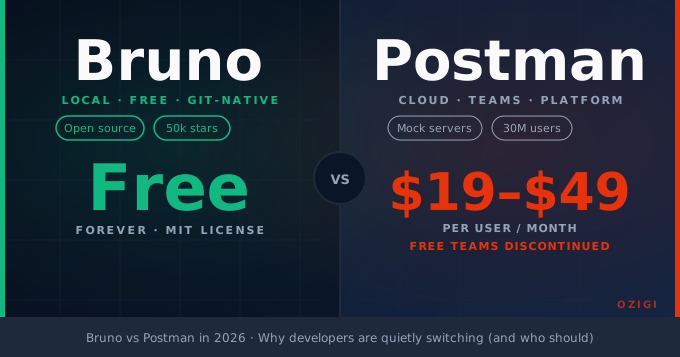
TL;DR: Bruno stores your API collections as plain text files on your filesystem, so they live in Git alongside your code. Postman stores everything in the cloud and has steadily moved features behind a paywall. If you work alone or on a Git-first team and mostly need to test and debug APIs, Bruno is faster, free, and fits the workflow you already have. If your team needs mock servers, documentation hosting, or non-developers in the loop, Postman still has the edge.
Postman used to open in under two seconds. You clicked it, the window appeared, and you started testing. That window of time is now long enough to refill your coffee. On a modern M1 MacBook, Postman's startup sits around 4.5 seconds before it is interactive, not because your machine is slow, but because Postman is no longer just an API client. It is a platform: workspaces, a learning centre, a marketplace, cloud sync, AI features, governance tools. The weight of all of that loads every time you open the app.
Bruno is also built on Electron. It opens in about 0.8 seconds.
That gap is a useful symbol for what separates these tools in 2026. It is not that Bruno is technically superior — it isn't, on every dimension. But the two tools embody different philosophies about what an API client should be, and depending on how your team works, one of those philosophies will fit you considerably better than the other.
What Changed That Made This Comparison Necessary
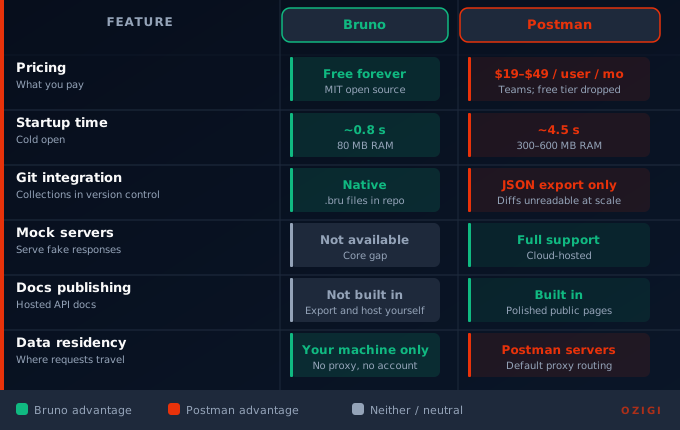
The migration pressure started in 2023 when Postman restricted its Scratch Pad, the offline mode that let you work locally without an account. Before that change, many developers quietly used Postman as a local tool while ignoring its collaboration features. Postman's move made that harder, and then increasingly impossible. You need an account to use it. Your collections sync to Postman's cloud. By early 2026, Postman's pricing had eliminated free teams entirely, landing at $19–$49 per user per month for team features.
That sequence of decisions sent a lot of developers looking around.
Bruno launched in late 2022, built by developer Anoop M D around a single principle: your API collections are files, and they should live on your machine. The app has no concept of a login. There is no cloud. Collections are stored as plain text .bru files in folders you choose. It crossed 25,000 GitHub stars in its first year and sits above 50,000 today. For a developer tool with no marketing budget and no VC-backed growth team, that trajectory indicates genuine word-of-mouth from people who switched and liked what they found.
The Core Difference: Cloud vs. Filesystem
This is where you need to decide which tool to evaluate seriously.
In Postman, a "collection" is an object that lives in Postman's cloud workspace. You export it as a JSON file if you want to move it, but that JSON file can be thousands of lines for a moderately complex API. Diffing a 4,000-line JSON blob in a pull request is not a real review — it is a formality you sign off on without reading.
In Bruno, a collection is a folder on your computer. Each API request is a separate .bru file, plain text, readable, diffable. A PR that changes a POST endpoint and updates the corresponding Bruno request shows both changes in the same diff. A reviewer can see exactly what the request did before and after. You can co-locate the collection inside your project repository: my-app/api-tests/ sits next to my-app/src/. When you check out a feature branch, your API tests are on that branch too.
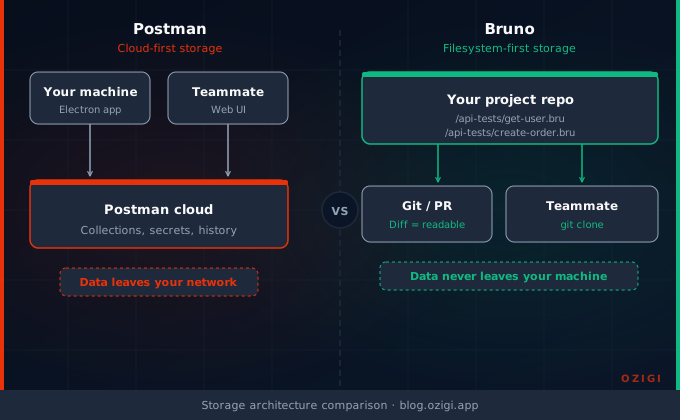
This is not just a workflow preference. It has a security implication. Bruno never sends your data anywhere. There is no proxy, no sync, no server it communicates with. Postman routes requests through its own infrastructure by default. In regulated environments — banking, healthcare, anything subject to data residency requirements — that difference has caused organisations to block Postman entirely and look for something that keeps requests on the local network.
If your team's API collections contain staging credentials, internal endpoint URLs, or response data from sensitive systems, Bruno's model is structurally different. Secrets go in a .env file that you add to .gitignore. The rest of the collection commits cleanly.
Performance and Resource Use
Bruno uses roughly 80MB of RAM during normal use. Postman regularly sits between 300MB and 600MB, depending on collection size and how many features are running.
For developers who already have a browser, an IDE, a local database, a Docker daemon, and a few other things running, 500MB for an API client is an irritating tax. On machines with 8GB or 16GB of RAM, it's noticeable. On older hardware or resource-constrained development setups, it tips from irritating into actually slowing your day down.
Bruno's speed advantage comes from what it does not do. It does not run a learning centre in the background. It does not sync your workspace. It loads collections from disk instantly because they are just folders. Opening a collection with 50 requests takes about 0.8 seconds. The equivalent in Postman runs closer to 4–5 seconds.
This sounds like a small thing. But when you open and close an API client 20 times a day because you are context-switching between feature work and debugging, small things compound into workflow friction.
Where Bruno Falls Short
Bruno is not a complete replacement for Postman if your workflow depends on things Postman built over a decade.
No mock servers. Postman can serve mock responses from its cloud so your frontend team can develop against a stable contract before the real API exists. Bruno cannot do this. If mock servers are a regular part of how your team ships, Bruno does not replace Postman today.
No documentation hosting. Postman can publish polished, versioned API documentation from your collections — something teams, partners, and clients can read without technical setup. Bruno has no equivalent. You export; you host yourself.
No built-in monitoring. Postman can schedule collection runs and alert you when endpoints fail. Bruno runs collections via its CLI (bru run) and produces output, but scheduling and alerting are not built in. You can wire it into a CI pipeline, which is actually a cleaner integration, but it requires setup.
OAuth 2.0 edge cases. Standard Bearer token and API key auth works fine in Bruno. More complex flows — JWT assertions, specific enterprise OAuth configurations — may require custom scripting where Postman handles them natively through a UI.
Script compatibility is not automatic. Postman uses pm.* globals in its test scripts. Bruno uses a similar but distinct JavaScript API. If you migrate from Postman, your existing test scripts need updating — some substantially, some just variable name changes — but none are drop-in compatible.
Non-developers cannot easily participate. Bruno's collaboration model is Git. If your QA team, product managers, or technical writers need to view or edit API collections without touching a terminal, Bruno puts friction in that path. Postman's workspace UI handles that audience.
Who Should Switch
The answer is not universal, but it is less complicated than most comparisons make it.
Switch to Bruno if: you work alone or on a team of developers who are already comfortable with Git, your API collections are not being actively used by non-technical collaborators, you do not depend on mock servers or hosted documentation, and you have felt the Postman paywall creeping toward work you used to do for free. The migration from Postman takes a weekend: export your Postman collection as JSON, import it into Bruno, pick a folder in your repository, and Bruno auto-converts the structure. You will need to revise test scripts, but the collection itself comes over cleanly.
Stick with Postman if: your team includes non-developers who interact with API collections through Postman's workspace, you rely on mock servers or hosted documentation, you manage complex enterprise OAuth flows that Postman handles natively, or your organisation has already standardised on Postman's governance and monitoring tooling at scale. For a team of 50 engineers managing a large API surface with external consumers, switching right now introduces more disruption than the subscription cost justifies.
The overlapping middle: if you are a solo developer or a small team of two to four engineers working in a normal feature-driven Git workflow, Bruno handles 90% of what you actually use Postman for every day — and it does it without the account, the cloud dependency, or the creeping subscription cost. The remaining 10% is real, but most of it is features you may not have been using anyway.
The Broader Pattern
Bruno is not an isolated case. It fits a pattern you can see across the developer tooling landscape: tools that started as simple utilities, found product-market fit, grew into platforms, and then began adding features to justify higher prices, even when most of their users wanted the original simple thing.
Git-native workflows are increasingly the default for engineering teams. Infrastructure is in code. Configuration is in code. Tests are in code. API collections being the one thing that lives in a proprietary cloud workspace is increasingly strange. Bruno exists because that strangeness finally produced enough frustration to build around.
It will not stay this simple forever. As Bruno's user base grows and enterprise demand increases, the pressure to add more platform features will arrive. For now, though, it is a well-maintained open-source tool that does one thing exceptionally well: lets you test APIs from the same environment where you write the code that depends on them.
That is not a revolution. It is just a workflow that makes sense.
All performance figures cited in this article — startup times, RAM usage — are drawn from documented community benchmarks and published comparisons. Your results will vary based on hardware, collection size, and system load.
About the author
Samuel Thomas is a Technical Writer, DevRel, and Technology Advocate passionate about simplifying complex technologies for developers and businesses. He specializes in API and product documentation, Docs-as-Code workflows, developer education, and developer marketing.